Sandbox Lifecycle and State Transition Control
ROCK persists each sandbox's lifecycle as a state machine. This keeps user operations, runtime observations, automatic expiration, archive recovery, and cleanup on one validated transition path.
In this guide, state is the lifecycle state that ROCK writes to its metadata store and returns as the state field of Sandbox.get_status(). It identifies the sandbox's current stage and determines whether operations such as stop, restart, archive, and delete are valid. The runtime backend reports a live observation of the sandbox and can briefly differ from the persisted state; ROCK converges them through status checks and the reconciler. The status and phases fields returned by Sandbox.get_status() describe substeps such as image pulling, sandbox creation, startup, or archiving and include diagnostic errors. They show progress and aid troubleshooting but are not separate lifecycle states.
1. State model
| State | Meaning | Is the sandbox usable? |
|---|---|---|
pending | A new sandbox, restart, or archive restore has been submitted and is waiting to become ready. | No |
running | ROCK has confirmed that the sandbox is ready for commands and service access. | Yes |
stopped | The sandbox has stopped, but metadata and—where supported—the local sandbox instance remain available. | No |
archiving | ROCK is asynchronously saving the sandbox container's rootfs and log directory. | No |
archived | Remote archive artifacts are ready; ROCK releases the local runtime resources. | No |
deleted | Terminal soft-delete state. Runtime and archive artifacts are removed where applicable, while the database record remains for audit. | No |
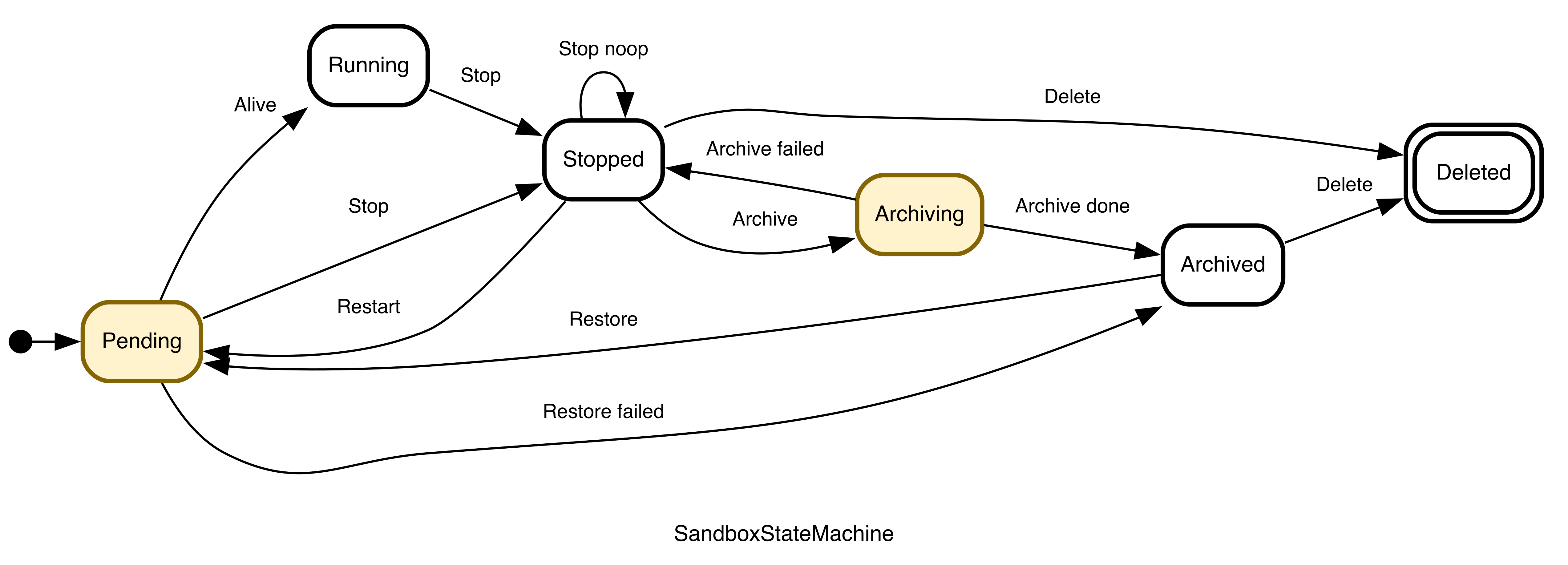
Invalid transitions are rejected rather than silently ignored. The two intentional idempotent cases are stopping an already stopped sandbox and deleting a missing or already deleted sandbox.
2. User operations and transition rules
| API | Accepted source state | Result | Important behavior |
|---|---|---|---|
Sandbox.start() | New sandbox | pending, then running | The create time, full requested spec, and expiration metadata are persisted before readiness is reported. |
Sandbox.stop() | pending or running | stopped | Always records stop_time. Repeating stop in stopped is a no-op. A sandbox configured with remove_container/--rm immediately continues to deleted. |
Sandbox.restart() | stopped or archived | pending, then running | From stopped, ROCK restores the saved spec, starts the existing sandbox instance on its original host, clears stale phases, and resets expiration; a missing original host prevents restart. From archived, ROCK retrieves the archived directory and image and reschedules the sandbox; failure or timeout returns it to archived. |
Sandbox.archive() | stopped | archiving, then archived | Asynchronous. Requires archive to be enabled and both image-registry and directory-storage credentials. Failure or timeout returns to stopped. |
Sandbox.delete() | stopped or archived | deleted | Removes the sandbox container from the Worker. For an archived sandbox, it also removes the related artifacts from remote directory storage and the image registry. Stop a live sandbox first. |
Do not use delete() as a substitute for stop() when you may need the sandbox again. deleted is terminal: ROCK removes the sandbox container from the Worker; for an archived sandbox, it also removes the log archive from remote directory storage and the rootfs archive from the image registry, so the sandbox can no longer be restored.
3. Observe the complete lifecycle
For backward compatibility, get_status() without arguments only exposes pending and running; stopped and later states look like “not found.” To query stopped, archiving, archived, or deleted, call get_status(include_all_states=True):
status = await sandbox.get_status(include_all_states=True)

print(status.state)          # pending/running/stopped/archiving/archived/deleted
print(status.create_time)        # sandbox creation time
print(status.start_time)         # time when the sandbox first became ready
print(status.stop_time)          # time when the sandbox most recently stopped
print(status.auto_stop_time)     # absolute time of the next scheduled automatic stop
print(status.auto_archive_time)  # absolute time of the next scheduled automatic archive
print(status.auto_delete_time)   # absolute time of the next scheduled automatic delete

for transition in status.state_history:
    print(
        transition["timestamp"],
        transition["from_state"],
        "--", transition["event"], "-->",
        transition["to_state"],
    )
The status.state_history field in the result of Sandbox.get_status() contains the state-transition history. Each non-self transition records from_state, to_state, event, and an ISO 8601 timestamp, and ROCK retains the latest 100 records per sandbox. auto_stop_time, auto_archive_time, and auto_delete_time expose the absolute deadline for the currently effective policy; fields that do not apply to the current state are None. Startup status/phases remain diagnostic details; they are not additional lifecycle states.
4. Automatic lifecycle control
Lifecycle automation has the following four scenarios. Find the relevant scenario first, then compare the user parameter with the cluster configuration:
| Automatic lifecycle scenario | User parameter (set in SDK SandboxConfig) | Related cluster configuration parameter |
|---|---|---|
Automatic stop for a pending / running sandbox | auto_clear_seconds | lifecycle.auto_transition.auto_clear_seconds is only a fallback when the request omits an auto-stop time |
Automatic archive for a stopped sandbox | auto_archive_seconds | lifecycle.auto_transition.auto_delete_seconds caps the user archive delay and supplies the cleanup grace period after archive failure |
Automatic delete for a stopped sandbox | auto_delete_seconds | lifecycle.auto_transition.auto_delete_seconds supplies the default delete delay when the user omits one and caps the user delete delay |
Automatic delete for an archived sandbox | No user parameter | lifecycle.auto_transition.auto_delete_archived_seconds |
4.1 Related parameters accepted by Sandbox.start()
Set these fields on SandboxConfig; Sandbox.start() submits them with the create request:
| SDK parameter | SDK default | User-visible meaning | Relationship to cluster configuration |
|---|---|---|---|
startup_timeout | 180, configurable with ROCK_SANDBOX_STARTUP_TIMEOUT_SECONDS | Startup timeout in seconds. The SDK submits it to the server and also uses it as the local limit while start() waits for the sandbox to become ready. | The server starts with the request value, then clamps it between the cluster minimum and maximum. The effective server value is not written back to the SDK, so the SDK's local wait still uses the user-supplied value. |
auto_clear_seconds | 300 | Idle timeout while pending/running; expiration moves the sandbox to stopped. Status activity refreshes the timeout. The SDK rounds seconds up to a whole number of minutes before submitting. | The Python SDK normally submits 300, so it overrides cluster auto_clear_seconds. The cluster value is used only when the request omits an auto-stop time. |
auto_archive_seconds | None | Counted from the actual transition to stopped. None disables per-sandbox auto-archive, 0 schedules it immediately, and a positive integer waits that many seconds. | Mutually exclusive with user auto_delete_seconds. When cluster auto_transition.auto_delete_seconds is not None, the effective delay is the smaller of user auto_archive_seconds and that cluster value. Archive must also be enabled and storage configured at cluster level. |
auto_delete_seconds | None | When archive is not selected, counted from the actual transition to stopped. 0 deletes immediately; a positive integer waits that many seconds. | When None and archive is unset, inherits cluster auto_delete_seconds. When both user and cluster values exist, the smaller value is effective. |
auto_archive_seconds and auto_delete_seconds accept only non-negative integers. The Python SDK rejects setting both:
from rock.sdk.sandbox.client import Sandbox
from rock.sdk.sandbox.config import SandboxConfig

# Example 1: stop after 30 idle minutes, then archive one day after stop.
archive_sandbox = Sandbox(
    SandboxConfig(
        image="python:3.11",
        auto_clear_seconds=30 * 60,
        auto_archive_seconds=24 * 60 * 60,
    )
)
await archive_sandbox.start()

# Example 2: stop automatically after 30 minutes, then delete seven days after stop.
# Do not also set auto_archive_seconds.
delete_sandbox = Sandbox(
    SandboxConfig(
        image="python:3.11",
        auto_clear_seconds=30 * 60,
        auto_delete_seconds=7 * 24 * 60 * 60,
    )
)
await delete_sandbox.start()
4.2 Cluster parameters
Administrators configure startup timeout, automatic transitions, and archive policy under lifecycle:
lifecycle:
  # Fast convergence for pending and archiving states.
  reconcile_interval_seconds: 30

  # Used when a client does not provide startup_timeout.
  default_startup_timeout_seconds: 600

  # Cluster floor for startup_timeout; smaller client values are raised to it.
  min_startup_timeout_seconds: 600

  # Cluster ceiling for startup_timeout; larger client values are capped at it.
  max_startup_timeout_seconds: 1800

  auto_transition:
    interval_seconds: 180
    auto_clear_seconds: 1800
    auto_delete_seconds: null
    auto_delete_archived_seconds: null

  archive:
    enabled: false
    # null allows every key; a list limits archive calls by X-Key.
    allowed_keys: null
    archive_timeout_seconds: 1800
    restore_timeout_seconds: 1800
    max_image_push_size: 16g
    max_dir_upload_size: 16g
    dir_storage:
      type: oss
      endpoint: ""
      bucket: ""
      access_key_id: ""
      access_key_secret: ""
      region: ""
      prefix: rock-archives/
    registry:
      registry_url: ""
      username: ""
      password: ""
      namespace: sandbox_archive
Cluster parameter (path under lifecycle) | Default | Complete role |
|---|---|---|
reconcile_interval_seconds | 30 | How often the primary Admin service instance reconciles transitional states: advance ready pending → running, observe archive results, and handle archive or restore timeouts. It does not scan the deadline-based automatic stop, archive, and delete actions below. |
default_startup_timeout_seconds | 600 | Server default when a start request omits startup_timeout. This budget covers image pull and runtime startup. Normal SDKs explicitly submit their own default, so they usually do not use this value. |
min_startup_timeout_seconds | 600 | Server-side startup-timeout floor. A request or default below this value is raised to it. |
max_startup_timeout_seconds | 1800 | Server-side startup-timeout ceiling. A request or default above this value is capped at it. |
auto_transition.interval_seconds | 180 | Interval between due-action scans on the primary Admin service instance. Execution can lag a deadline by one scan interval plus earlier work in that scan. |
auto_transition.auto_clear_seconds | 1800 | Default only when a start request omits an auto-stop time. The normal Python SDK submits its own auto_clear_seconds, so it usually does not use this fallback. |
auto_transition.auto_delete_seconds | None | (1) Default stopped → deleted delay when the user chooses neither archive nor delete;(2) per-sandbox archive/delete delay cap—larger requests are truncated to cluster auto_transition.auto_delete_seconds, not rejected;(3) cleanup grace period after archive failure or timeout. None disables all three roles. |
auto_transition.auto_delete_archived_seconds | None | Retention after entering or re-entering archived. None keeps the archive indefinitely, 0 schedules immediate deletion, and a positive integer retains it for that many seconds. This is a cluster setting; the current SDK SandboxConfig has no corresponding parameter, so users cannot specify archive retention through Sandbox.start(). |
archive.enabled | false | Enables archive and restore. The cluster must enable this and configure archive storage before a user can set auto_archive_seconds. |
archive.allowed_keys | None | X-Key values allowed to use archive. None imposes no key restriction; a list allows only matching keys. |
archive.archive_timeout_seconds | 1800 | Timeout for one archive operation, in seconds. On expiry, reconciliation marks the archive failed and returns the sandbox to stopped. |
archive.restore_timeout_seconds | 1800 | Server-side overall timeout used when Sandbox.restart() restores an archived sandbox. It covers pulling the archived image, downloading the log directory, recreating and starting the sandbox, and waiting for it to become available. On expiry, the restore fails and the sandbox returns to archived. During the startup stage of restore, the server also applies the sandbox's saved startup_timeout. |
archive.max_image_push_size | 16g | Maximum archive image size that may be pushed to the registry, for example 16g; exceeding it fails the archive. An empty string disables this check. |
archive.max_dir_upload_size | 16g | Maximum sandbox archive-directory size that may be uploaded to directory storage, for example 16g; exceeding it fails the archive. An empty string disables this check. |
The server computes startup timeout by taking the request's startup_timeout, falling back to lifecycle.default_startup_timeout_seconds when omitted, and then applying the minimum and maximum bounds in that order.
Restoring an archived sandbox involves three timeout layers:
- Overall server restore timeout:
archive.restore_timeout_secondslimits the complete flow from retrieving the remote archive through making the sandbox available. - Server startup timeout: when the sandbox is created, the server saves the
startup_timeoutafter applyingdefault_startup_timeout_seconds,min_startup_timeout_seconds, andmax_startup_timeout_seconds. During restore, this saved value limits the availability check after the sandbox has been recreated and started. A successful restore must satisfy both the overall restore timeout and the server startup timeout. - SDK local wait timeout: the caller's current
SandboxConfig.startup_timeoutlimits how longSandbox.restart()waits locally for the sandbox to become available. The server-adjusted value is not written back to the SDK, so the client and server values can differ.
If the SDK wait expires first, Sandbox.restart() raises a client-side error without cancelling the server restore. The server continues under its own overall restore and startup limits. By default, the SDK startup_timeout is 180 seconds, the server raises that submitted value to the default cluster floor of 600 seconds, and archive.restore_timeout_seconds is 1800 seconds. The client can therefore time out before the server. Configure a sufficiently long SDK startup_timeout when the caller must wait synchronously for a slow archive restore.
Cluster-level auto_archive_seconds has been removed. Static YAML that still contains it is rejected as an unknown field and must be cleaned before upgrade.
4.3 Meaning of None, 0, and a positive integer
| Parameter | None | 0 | Positive integer |
|---|---|---|---|
User auto_archive_seconds | No automatic archive | Schedule archive immediately after stop | Wait the specified number of seconds after stop, then archive |
User auto_delete_seconds | Inherit cluster auto_transition.auto_delete_seconds when archive is unset | Delete immediately after stop | Wait the specified number of seconds after stop, then delete |
Cluster auto_transition.auto_delete_seconds | No default post-stop delete, no user-delay cap, and no archive-failure cleanup | Default to immediate delete and cap every user archive/delete delay at 0 | Use the specified number of seconds as the default delete delay, the maximum user delay, and the archive-failure cleanup grace period |
Cluster auto_transition.auto_delete_archived_seconds | Keep archives indefinitely | Schedule deletion immediately after archive | Retain the archive for the specified number of seconds after archive succeeds or restore fails |
“Schedule immediately” means the deadline is now. Scan-based work can still wait up to one interval_seconds cycle; when auto_delete_seconds=0, a sandbox configured with --rm may also transition directly to deleted during stop.
4.4 User/cluster precedence
This matrix covers every stopped-stage combination:
User auto_archive_seconds | User auto_delete_seconds | Cluster auto_transition.auto_delete_seconds | Action after stopped | Effective delay |
|---|---|---|---|---|
| Set | None | None | Archive | User auto_archive_seconds |
| Set | None | 0 or positive | Archive | Smaller of user auto_archive_seconds and cluster auto_transition.auto_delete_seconds |
None | Set | None | Delete | User auto_delete_seconds |
None | Set | 0 or positive | Delete | Smaller of user auto_delete_seconds and cluster auto_transition.auto_delete_seconds |
None | None | None | No automatic archive or delete | No deadline |
None | None | 0 or positive | Delete | Cluster auto_transition.auto_delete_seconds |
The Python SDK does not permit setting both user auto_archive_seconds and auto_delete_seconds. If a direct HTTP caller sends both, the server gives archive precedence. When cluster auto_transition.auto_delete_seconds is None, the effective delay is user auto_archive_seconds; otherwise it is the smaller of user auto_archive_seconds and cluster auto_transition.auto_delete_seconds. User auto_delete_seconds does not affect the runtime policy, although both requested values remain in spec.
After the sandbox enters archived, user auto_archive_seconds, user auto_delete_seconds, and cluster auto_transition.auto_delete_seconds no longer determine retention. Only cluster auto_transition.auto_delete_archived_seconds applies. The current SDK SandboxConfig has no corresponding parameter, so users cannot specify this retention period through Sandbox.start().
4.5 How state changes create deadlines
ROCK converts relative seconds into an absolute database timestamp. Later cluster configuration changes do not retroactively alter deadlines already created for stopped or archived sandboxes.
| Event | Next action and deadline | Status API field |
|---|---|---|
Created and in pending/running | Calculate auto-stop from effective auto_clear_seconds; status activity refreshes it | auto_stop_time |
First entry into stopped, effective policy is archive | archived at stop_time + effective auto_archive_seconds | auto_archive_time |
First entry into stopped, effective policy is delete | deleted at stop_time + effective auto_delete_seconds | auto_delete_time |
stop() called again in stopped | stop_noop; do not recalculate the deadline | Preserve existing value |
Archive succeeds and enters archived | No next action when cluster auto_transition.auto_delete_archived_seconds is None; otherwise wait that many seconds after archive_time, then delete | auto_delete_time or None |
Archive fails or times out and returns to stopped | No automatic delete when cluster auto_transition.auto_delete_seconds is None; otherwise wait that many seconds after failure, then delete | auto_delete_time or None |
Restart stopped or restore archived | Clear the old deadline on entry to pending; calculate again on the next real stop | Old archive/delete time becomes None |
Restore fails or times out and returns to archived | Recalculate from failure time using cluster auto_transition.auto_delete_archived_seconds; retain indefinitely when that value is None | auto_delete_time or None |
Enter deleted | Clear automatic transition and auto-stop timestamps | All three automatic timestamps are None |
4.6 Background execution and operations
The primary ROCK Admin service instance runs two non-overlapping, coalesced loops:
- The reconciler checks
pendingandarchiving, advances successful work, and handles archive/restore failure or timeout. - The automatic transition scan runs auto-stop, stopped-sandbox deletion, stopped-sandbox archive, and archived-sandbox deletion in that order. Each action processes at most 1000 rows, with the oldest deadline first.
Execution is at-least-once. If the primary Admin service instance is temporarily unavailable, deadlines remain in the database and ROCK continues processing them after the service instance recovers.
Clusters using deadline-based lifecycle management should disable ContainerCleanupTask. That task deletes exited sandbox containers by Docker timestamps without consulting ROCK state or deadlines. It can remove a local sandbox container before ROCK archives it and does not update the database state.
5. Archive and restore failure behavior
Archiving is not complete when archive() returns. Wait until the durable state becomes archived:
import asyncio

await sandbox.stop()
await sandbox.archive()

while True:
    status = await sandbox.get_status(include_all_states=True)
    if status.state == "archived":
        break
    if status.state == "stopped":
        raise RuntimeError("Archive failed or timed out and can be retried")
    await asyncio.sleep(3)

# restart() detects archived and performs restore automatically.
await sandbox.restart()
The reconciler checks the remote archive phase. Success moves archiving → archived; a reported failure or archive_timeout_seconds moves it back to stopped. During restore, archive_time distinguishes restore work from an ordinary restart. If it does not become alive within restore_timeout_seconds, ROCK returns it to archived, preserving the remote recovery point for another attempt.
After an archive failure or timeout, ROCK does not retry archive automatically. If cluster auto_transition.auto_delete_seconds is configured, ROCK sets the next automatic transition to deleted, with a deletion time equal to the archive failure time plus auto_transition.auto_delete_seconds. If the parameter is None, no next automatic transition is scheduled and the sandbox remains stopped. Before automatic deletion runs, the user may call Sandbox.archive() again manually.
After Sandbox.restart() is called for an archived sandbox, the sandbox first enters pending. If restore encounters an unrecoverable error or does not make the sandbox available within archive.restore_timeout_seconds, ROCK returns the sandbox to archived and preserves the remote archive so that Sandbox.restart() can be attempted again. If cluster auto_transition.auto_delete_archived_seconds is configured, ROCK recalculates the next automatic deletion time from the restore failure time: None disables automatic deletion, 0 schedules deletion immediately, and a positive integer waits that many seconds before deletion.
6. Operator backend support
The table starts from the user-facing Sandbox SDK methods and reflects the actual capability of each Operator in ROCK 1.11. “Supported” means the Operator performs the corresponding backend operation, not merely that ROCK has a matching persisted state:
| Operator backend | Sandbox.start() / Sandbox.get_status() | Sandbox.stop() | Sandbox.restart() (stopped) | Sandbox.archive() / Sandbox.restart() (archived) | Sandbox.delete() |
|---|---|---|---|---|---|
| Ray | Supported | Supported | Supported | Supported | Supported |
| Kubernetes | Supported | Supported, but deletes the BatchSandbox resource | Not supported | Not supported | Not supported |
| OpenSandbox | Supported | Not supported | Not supported | Not supported | Supported |
Therefore, workflows that depend on stopped → pending restart or stopped → archiving → archived currently require the Ray Operator. Kubernetes stop deletes the backend workload; for OpenSandbox, use delete when the sandbox should be terminated.